Ever zoomed into a logo design only to watch it turn into a blurry, blocky mess? That frustrating moment is exactly why understanding vector art vs. raster images matters so much! Whether you’re printing t-shirts, stitching embroidery, or engraving a beautiful sign, the type of image file you use can make or break your final product.
At Iconicstitches, we work with both formats every single day, and we’ve seen how the right file transforms an ordinary design into something crisp and professional. In this complete guide, you’ll learn what vector art and raster images actually are, how they differ, which file formats to use, and when each one shines. By the end, you’ll know exactly which format your project needs — and why professional vector conversion is worth every penny.
Let’s dive in!
What Are Raster Images?
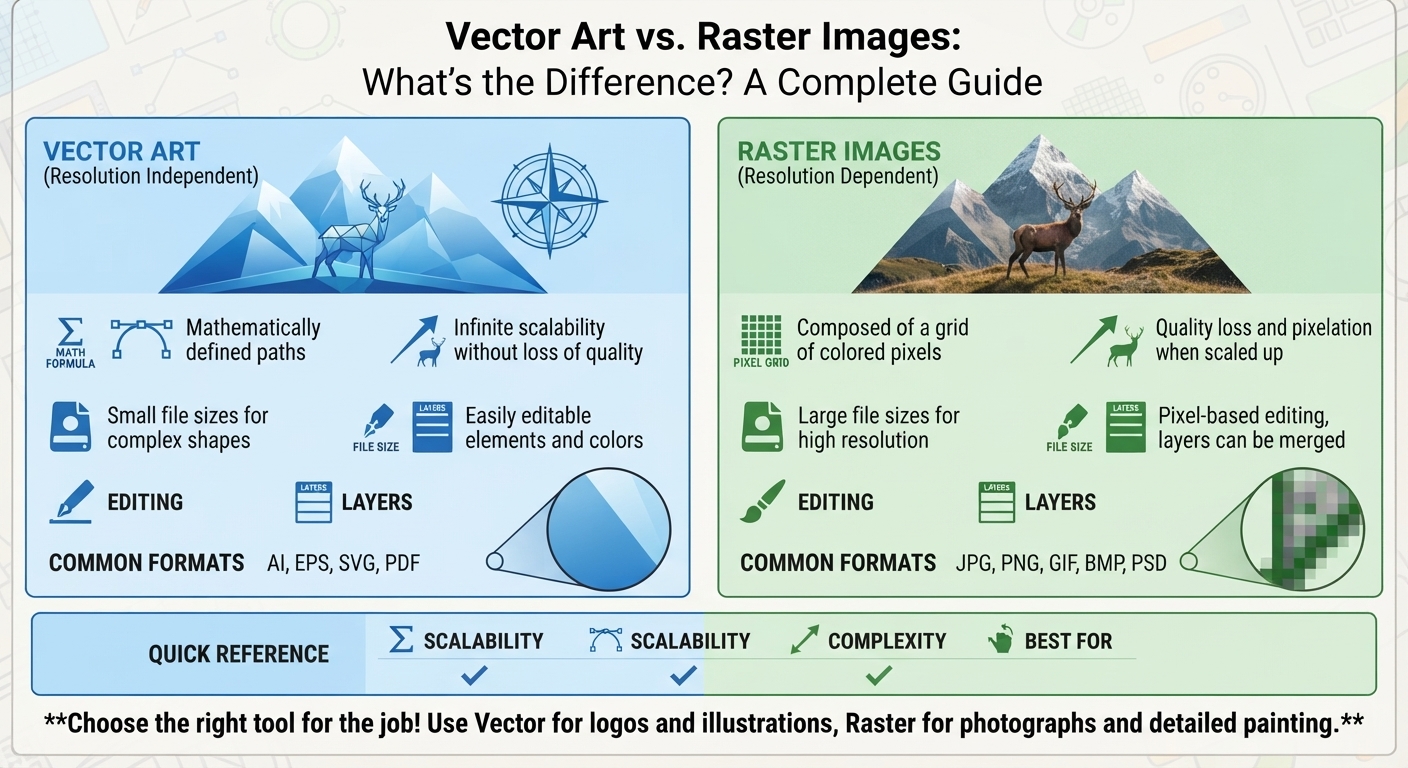
Raster images are made up of tiny squares called pixels. Think of them like a mosaic: thousands of little colored tiles come together to form a complete picture. Photos taken on your phone, screenshots, and most images you see online are raster files.
Because raster images rely on a fixed number of pixels, they have a set resolution. When you enlarge them beyond that limit, the pixels stretch and the image looks fuzzy or pixelated. That’s why a small logo pulled from a website often looks terrible when blown up for a banner.
Common Raster File Formats
- JPG (JPEG): Great for photos and web images. It compresses files to save space but loses a bit of quality each time you save.
- PNG: Perfect when you need a transparent background. It keeps sharp edges and clean colors.
- GIF: Best for simple animations and basic graphics.
- TIFF: A high-quality format often used in professional printing.
Raster images are fantastic for detailed, colorful photographs where subtle shading matters. But they have one big weakness: they don’t scale well.
What Is Vector Art?
Vector art is a whole different world! Instead of pixels, vector graphics use mathematical formulas to create paths, lines, and curves. These paths connect points to form shapes, and because they’re based on math rather than a fixed grid, you can resize them infinitely without losing a shred of quality.
Want to shrink your logo onto a pen or blow it up onto a billboard? A vector file handles both flawlessly. The edges stay razor-sharp, the colors stay clean, and the file never turns blocky. This is why logos, icons, illustrations, and print designs are almost always created as vectors.
Common Vector File Formats
- AI (Adobe Illustrator): The industry standard for creating and editing vector artwork.
- EPS: A versatile, widely compatible format perfect for printing and sharing across software.
- SVG: Ideal for websites and screens because it stays crisp at any size and loads fast.
- PDF: Can store vector data and is easy to share and print.
If you need AI vector conversion, EPS vector conversion, or SVG conversion service in the USA, these are the formats a professional will deliver.
Vector Art vs. Raster Images: The Key Differences
Now that you know the basics, let’s compare them side by side. Understanding these differences helps you choose the right tool for every job.
1. Scalability
This is the biggest difference! Vector art scales to any size without quality loss. Raster images become blurry and pixelated when enlarged. If you plan to use one design across business cards, shirts, and signs, vector is your best friend.
2. File Size
Vector files are usually smaller because they store math formulas instead of millions of pixels. Raster images, especially high-resolution photos, can get huge and slow to load.
3. Editing Flexibility
logo-designWith vector art, you can move, recolor, and reshape individual elements easily. DTF Raster editing is trickier — changing one part often means reworking whole sections of pixels.
4. Detail and Color Depth
Here’s where raster wins! Photographs with soft gradients, realistic shadows, and fine detail look best as raster images. Vectors are amazing for clean, bold designs but struggle to recreate photo-realistic scenes.
5. Best Use Cases
- Raster: Photographs, digital paintings, and detailed web graphics.
- Vector: Logos, icons, illustrations, and anything that needs printing at multiple sizes.
When Should You Use Each Format?
Choosing between vector and raster comes down to your project’s goal. Let’s break it down with real examples so you know exactly what to pick.
Use Raster When…
- You’re editing or sharing photographs.
- You need realistic images with rich shading.
- Your content lives mainly on screens at a fixed size.
Use Vector When…
- You’re designing a logo or brand identity.
- You need artwork that prints crisply at any size.
- You’re preparing files for embroidery, screen printing, engraving, or cutting.
Most professional production processes require vector files. That’s where services like raster to vector conversion USA and logo vectorization become essential.
Why Professional Vector Conversion Matters
Here’s a scenario we see all the time: a customer has a gorgeous logo, but it’s only a low-resolution JPG or PNG. They want it embroidered on shirts, and suddenly there’s a problem. Raster files simply don’t translate well to production machines.
That’s where professional vector conversion saves the day! Converting a raster image into clean vector art means your design will look sharp on every product, at every size.
Automatic Tracing vs. Manual Vector Tracing
You might have seen “one-click” tools that promise instant vector conversion. While they work in a pinch, they often leave messy edges, jagged lines, and inaccurate colors. That’s why manual vector tracing in the USA delivers far better results.
With hand traced vector art, a skilled designer redraws your image point by point, capturing every curve and detail exactly right. This precision matters enormously for logos and complex designs. At Iconicstitches, our vector tracing services USA focus on accuracy, so your artwork looks polished and production-ready.
Artwork Cleanup and Logo Redraw
Sometimes an old logo has blurry edges, outdated elements, or missing details. Our artwork cleanup service USA and logo redraw service USA fix these issues. We can vectorize your logo, refresh the lines, and prepare a print-ready logo vector that shines across every application.
Real-World Use Cases for Vector Art
Vector art isn’t just a technical detail — it’s the backbone of countless production methods. Here’s where it truly makes a difference!
Embroidery Vector Art
Embroidery machines follow precise digital paths to stitch your design. Clean vector files make this process smooth and accurate. Our embroidery vector art USA and vector art for embroidery digitizing ensure every stitch lands perfectly, giving you crisp, professional results on caps, shirts, and more. Iconicstitches embroidery vector conversion turns any image into stitch-ready artwork.
Screen Printing Vector Art
Screen printing separates designs into individual color layers. Vector files make this color separation clean and simple. With screen printing vector art USA, avatar art your bold graphics print with sharp edges and vibrant colors — no fuzzy outlines, no faded details.
T-Shirt Vector Design
Want a design that looks amazing on apparel? T-shirt vector design USA gives you scalable artwork that prints beautifully whether it’s a small chest logo or a full-back graphic. Iconicstitches USA t-shirt vector design keeps your apparel looking sharp wash after wash.
Laser Engraving Vector Art
Laser engravers read vector paths to guide their cutting and etching. Precise laser engraving vector art USA ensures clean lines on wood, metal, acrylic, and glass. Whether you need laser cutting vector files or engraving artwork, vectors deliver flawless detail.
Vinyl Cutting Vector Art
Vinyl cutters follow vector paths to slice out shapes for decals, signs, and stickers. Accurate vinyl cutting vector art USA guarantees clean cuts with no jagged edges. Give your cutter the right vector files for vinyl cutting and watch every decal come out perfect.
File Formats: Which One Do You Need?
Choosing the right file format depends on how you’ll use your design. Here’s a quick cheat sheet!
- For printing: EPS, PDF, or AI vector files.
- For websites: SVG for logos and icons, PNG for images with transparency, JPG for photos.
- For embroidery and cutting: Vector formats like AI, EPS, or SVG.
- For photos: JPG or TIFF for the best detail.
Need help converting? Services like JPG to vector conversion USA, PNG to SVG conversion, and image to vector conversion USA make it easy to get exactly the format your project requires.
Common Mistakes to Avoid
Before you send your artwork off to production, watch out for these slip-ups!
- Using low-resolution files for print: A tiny JPG won’t cut it for large prints. Convert it to vector first.
- Relying only on auto-tracing: For important logos, always choose professional or manual vectorization service quality.
- Ignoring color modes: Print projects usually need CMYK, while screens use RGB.
- Forgetting transparency: Use PNG or vector files when you need clean, background-free designs.
Avoiding these mistakes saves you time, money, and headaches down the road!
How Iconicstitches Can Help
We know files, formats, and production inside and out. Our vector art services USA cover everything you need to take your design from rough image to polished, production-ready artwork.
Here’s what we offer:
- Raster to vector conversion for crisp, scalable designs.
- Logo vectorization and logo redraw for fresh, sharp branding.
- Manual vector tracing for pixel-perfect accuracy.
- SVG, AI, and EPS vector conversion for any platform or process.
- Print ready vector artwork USA for embroidery, screen printing, DTG, engraving, and cutting.
- Artwork cleanup to refresh and repair existing files.
Whatever your project, we deliver custom vector artwork that’s ready to shine!
Frequently Asked Questions
Can I convert a raster image to vector myself?
You can try free tools, but the results are often messy. For clean, professional artwork — especially logos — a custom vector conversion service delivers far better quality.
What’s the best file format for embroidery?
Vector formats like AI, EPS, or SVG work best. They give embroidery machines the precise paths needed for clean stitching.
Why does my logo look blurry when I enlarge it?
Your logo is likely a raster file. Converting it into vector art through logo vectorization will keep it sharp at any size.
How long does professional vector conversion take?
Turnaround depends on complexity, but most projects are completed quickly. At Iconicstitches, we balance speed with careful, detailed craftsmanship.
Final Thoughts
Understanding vector art vs. raster images is the key to creating designs that look flawless everywhere — from tiny tags to giant banners. Raster images shine for photos, while vector art rules for logos, printing, and production. When you need artwork that scales beautifully and prints cleanly, vector is the way to go!
Ready to give your designs the professional edge they deserve? Explore Iconicstitches‘ vector art services today, and let our team turn your images into crisp, print-ready vector artwork you’ll love. Reach out now and let’s bring your vision to life!